

In this Review,
- 1-Minute Quick Review
- What Vouchpi Actually Does
- Vouchpi Pricing: Plans, Credits, and What You Actually Get
- Signup and the First Dashboard
- Client Manager: Our Favourite Part of Vouchpi
- Projects and Products & Services
- Creating a Quotation in Vouchpi
- Design Approvals: Much Better Than “Looks Good” on WhatsApp
- Delivery Challans: A Proper Tool for Goods Going Out
- Project Handovers: A Feature We Did Not Expect to Like This Much
- Invoices: Useful Because They Do Not Start From Zero
- Forms: More Useful When They Lead Somewhere
- Reviews: Vouchpi Still Knows This Part Very Well
- Public Walls: More Than a Page Full of Testimonials
- Products Beside Reviews Work Better Than We Expected
- WhatsApp and Email Fit the Way Clients Already Work
- Inbox, Notifications, Reminders, and Analytics
- Vouchpi Free Tools: Useful Even Without an Account
- Mobile Experience
- Privacy, Cookies, and Support
- What We Liked Most About Vouchpi
- What Vouchpi Still Needs to Improve
- Vouchpi vs Refrens vs Zoho Books vs Bonsai vs HoneyBook
- Vouchpi vs Bonsai
- Who Should Use Vouchpi?
- Who Should Skip Vouchpi?
- Frequently Asked Questions [FAQs]
- Final Verdict: Is Vouchpi Worth It?
We spend a surprising amount of time doing work around the actual work. We create quotations, ask clients for details, wait for approvals, send invoices, share files, follow up on payments, and eventually ask for a review. None of these tasks feels especially difficult on its own, but once we spread them across WhatsApp, email, forms, documents, spreadsheets, and different apps, keeping track of one client can become messy very quickly.
That is what caught our attention with Vouchpi. Instead of trying to replace accounting software, project-management tools, or every other business app, it focuses on the smaller pieces of client work that usually get scattered between them. Quotations, approvals, delivery challans, handovers, invoices, forms, client records, and reviews all sit inside the same platform, with the idea that one client should not feel like a new job every time we move to the next step.
For this Vouchpi review, we wanted to see whether that idea actually worked in practice. We added clients ourselves, let clients onboard through a QR code, created projects, saved products and services, sent quotations, accepted and rejected them from the client side, converted a quotation into an invoice, created approvals, delivery challans, handovers, and forms, sent review requests, built Public Walls, used reminders, and checked how the client-facing pages worked on mobile.
After spending time with it, we found that the individual tools were only part of the story. The quotation maker was useful, the approval workflow made sense, and the invoice system worked well, but Vouchpi became much more useful once those actions started building one clear history around the same client. That connection, more than any single feature, is what makes Vouchpi worth looking at.
1-Minute Quick Review

Vouchpi brings a lot of the everyday paperwork between a business and its clients into one place. It handles quotations, approvals, delivery challans, handovers, invoices, forms, client records, and reviews, but we think Client Manager gives all of those tools their real value.
Once we added a client, we could keep using the same information instead of typing it again for every document. A quotation could reach the client through WhatsApp or email, record whether they viewed and accepted it, and then turn into an invoice. Approvals kept feedback away from messy chat threads, handovers gave completed work a clear ending, and reviews became a natural next step instead of something we had to remember weeks later.
Vouchpi does ask for some work upfront. We had to create clients, projects, products, services, and other reusable pieces before the benefits became obvious. The first dashboard also throws a lot at you. After that initial setup, though, the platform became much easier to use.
Summary
| Category | Our Experience |
|---|---|
| Best for | Freelancers, photographers, designers, studios, consultants, agencies, and small service businesses |
| Best feature | Client Manager |
| Main idea | Keep different parts of a client job connected |
| Documents we tested | Quotations, approvals, delivery challans, handovers, and invoices |
| Other tools we tested | Forms, Projects, Products & Services, reviews, Moments, Public Walls, reminders |
| Client communication | Email, WhatsApp, links, and PDFs |
| Free plan | ₹0, 10 credits/month, up to 25 active clients |
| Paid plan | ₹249/month including GST, 30 credits/month, up to 500 active clients |
| 6-month plan | ₹1,299 — about 13% cheaper than monthly |
| Annual plan | ₹2,299 — about 23% cheaper than monthly |
| Biggest strength | Reuses client and project information instead of making every document feel separate |
| Biggest weakness | Initial setup and credit planning |
Vouchpi currently lists the Free plan with 10 monthly credits and up to 25 active clients, while Paid costs ₹249/month including GST, includes 30 monthly credits, and raises the active-client limit to 500. It also lists ₹1,299 for six months and ₹2,299 annually.
The Good
- Client Manager keeps a useful history of each client.
- Clients can onboard themselves using a QR code or link.
- We could reuse clients, projects, products, and services.
- Quotations let clients accept or decline online.
- Accepted quotations can turn into invoices.
- Approvals keep sign-offs and change requests in one place.
- Delivery challans include fields that actually matter for dispatch.
- Handovers give completed projects a much clearer ending.
- WhatsApp fits the way many Indian businesses already talk to clients.
- Reviews and Public Walls work naturally after completed projects.
- Free tools work without signup.
- The client-facing pages worked well on mobile.
- We did not run into a major failure during our testing.
Could Improve
- The first dashboard can feel crowded.
- Vouchpi becomes more useful only after you spend some time setting it up.
- Businesses with a lot of outgoing documents may need extra credits.
- Public Walls need real content and setup before they look complete.
What Vouchpi Actually Does
Vouchpi becomes easier to understand when we stop trying to squeeze it into one familiar software category. It has invoices, but it does not do full accounting. Stores clients, but it does not behave like a complex sales CRM. It has forms, but it does not try to compete only as a form builder. Reviews still matter, but Vouchpi now does much more than collect testimonials.
The current product follows six main stages: Quote, Approve, Dispatch, Hand over, Invoice, and Get vouched. It then connects those stages with Clients, Projects, Products & Services, Forms, and a dashboard that shows work that needs attention.
A simple example explains it better. A photographer may first send a wedding quotation, ask the client to approve an album design later, hand over the final gallery, issue the invoice, and finally ask for a review. Normally, those steps might happen across WhatsApp, email, Word, Drive, and an invoicing app. Vouchpi tries to keep more of that journey together.
| Stage | What Happens |
|---|---|
| Quote | Business sends the price and scope; client accepts or declines |
| Approve | Client reviews work and gives clear sign-off or requests changes |
| Dispatch | Business records goods sent through a delivery challan |
| Hand over | Business records final files, access, deliverables, and support |
| Invoice | Business sends the bill and keeps track of payment status |
| Get vouched | Business asks the client for a verified review |
We like this narrower direction. Vouchpi does not need to become the software that runs every part of a company. It works better when it focuses on the paperwork and decisions that move between the business and the client.
Vouchpi Pricing: Plans, Credits, and What You Actually Get
Vouchpi keeps the subscription side of its pricing fairly simple, but you need to understand the credit system before you decide whether it fits your business.
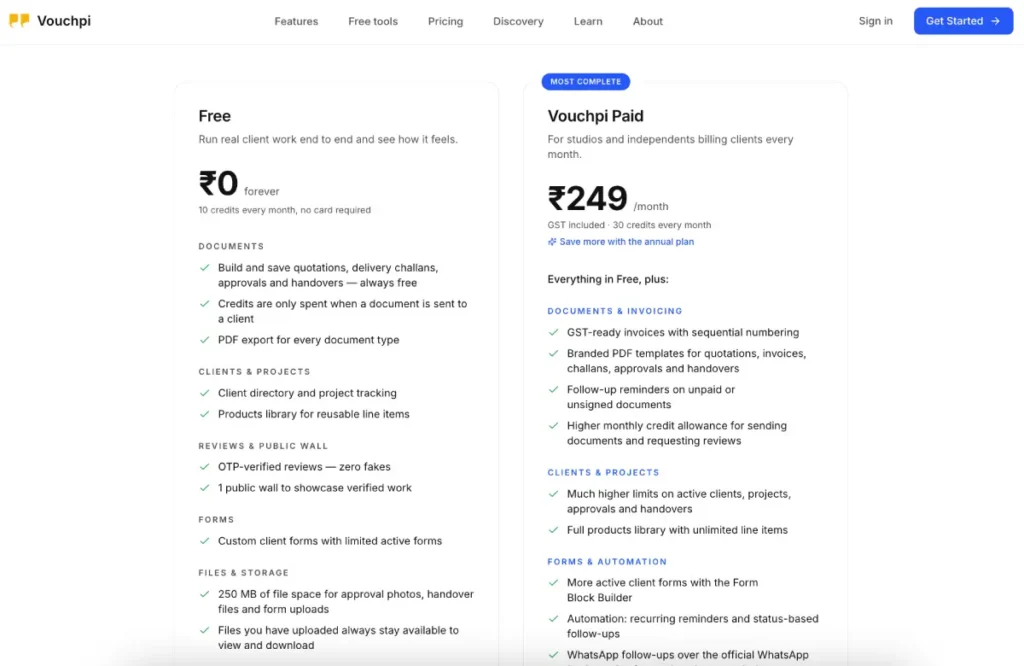
The Free plan gives you 10 credits every month and lets you keep up to 25 active clients. The paid plan costs ₹249 per month, including GST, gives you 30 monthly credits, and raises the active-client limit to 500. Paid also adds more automation, analytics, and communication features.
Vouchpi Plans
| Plan | Price | Monthly Credits | Active Clients |
|---|---|---|---|
| Free | ₹0 | 10 | Up to 25 |
| Paid Monthly | ₹249/month | 30 | Up to 500 |
| Paid – 6 Months | ₹1,299 | 30/month | Up to 500 |
| Paid – Annual | ₹2,299 | 30/month | Up to 500 |
The six-month plan works out roughly 13% cheaper than paying ₹249 every month, while the annual plan saves roughly 23%. We think the monthly plan makes more sense while you are still deciding whether Vouchpi suits your workflow. Once a business starts using it regularly, the annual price becomes much more attractive.
GST is already included in these Vouchpi prices, which also makes the amount easier to understand at a glance.
You Can Also Buy Extra Credits
The 30 credits on Paid are not a hard ceiling. Paid subscribers can buy more from the dashboard.
| Extra Credits | Price |
|---|---|
| 25 | ₹199 |
| 50 | ₹349 |
| 100 | ₹599 |
| 250 | ₹1,199 |
| 500 | ₹1,999 |
All of these prices include GST. The 100-credit pack appears as Best Value inside the dashboard, while larger packs give businesses much more room when they start sending documents more often.
We prefer this setup to having five or six confusing subscription tiers. A small freelancer can stay on the same Paid plan and simply top up when a busy month needs more credits.
How Vouchpi Credits Work
The important thing to know is that creating a document does not use credits. We could work on a quotation, save it, make changes, and prepare everything before Vouchpi charges anything. Credits mainly come into play when we actually send something to a client or receive certain client responses.
Here is what our pricing screen showed:
| Action | Credits |
|---|---|
| Send a quotation | 3 |
| Send an invoice | 5 |
| Send a delivery challan | 3 |
| Send an approval request | 2 |
| Send a handover | 3 |
| Receive a client form response | 1 |
| Quick Review request | 1 |
| Detailed Review request | 3 |
| Case Study Review request | 5 |
| Extra reminder or follow-up | 1 |
Vouchpi also says the same send costs the same whether you use email, WhatsApp, or both, so choosing both channels does not double the credit use.
This becomes easier to understand when we turn it into a real example. A freelancer who sends a quotation, an approval, a handover, an invoice, and then a Quick Review request uses 14 credits. Add a delivery challan, and that reaches 17 credits.
That means the included 30 credits may feel generous to one user and small to another. A designer handling two larger projects each month may manage comfortably. A business sending dozens of invoices will almost certainly need extra credits.
We do not see the credit system itself as a major problem. We simply think Vouchpi users should look at their real monthly workload instead of judging the product only by the ₹249 headline price.
Signup and the First Dashboard
Creating our Vouchpi account did not take long, although the signup asks for a few more details than a basic email-and-password form. We entered our full name, email, business or professional name, username, phone details, and password.
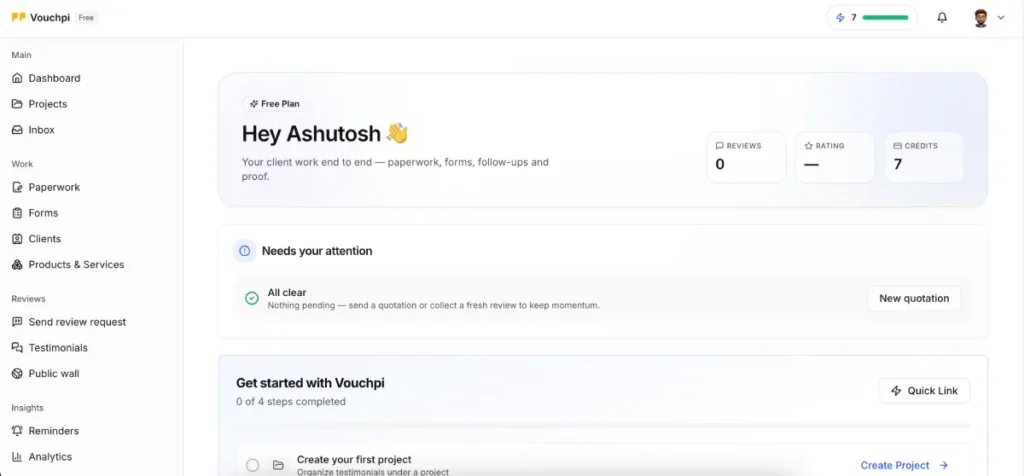
The business name and username seemed like extra steps at first, but they made more sense when we started sending things to clients. Vouchpi includes that identity in its messages, so the recipient knows which actual business sent the request instead of receiving a random message from an unfamiliar platform.
For example, one of our review requests told the client that Ashutosh Jain (@ashutosh) had invited them to share their experience. We think that is better than hiding the sender behind a generic Vouchpi notification.
The Dashboard Needs a Little Time
The first dashboard felt more overwhelming than signup. Vouchpi showed us Dashboard, Projects, Inbox, Paperwork, Forms, Clients, Products & Services, review tools, Public Walls, Reminders, and Analytics almost immediately.
Once we understood how the pieces worked together, the dashboard stopped feeling complicated. The easiest way to approach Vouchpi is:
- Add or onboard a client.
- Create a project.
- Save common products or services.
- Create the document you need.
- Send it to the client.
- Record their response.
- Move the job to its next stage.
- Ask for a review when the work finishes.
Vouchpi itself now presents a similar first setup path on its How It Works page: add a client and project, save products/services, send the first quotation, and request a vouch after delivery.
We would still like Vouchpi to teach this more strongly inside the actual dashboard. The product feels simpler once you understand the order than it does during the first few minutes.
Client Manager: Our Favourite Part of Vouchpi
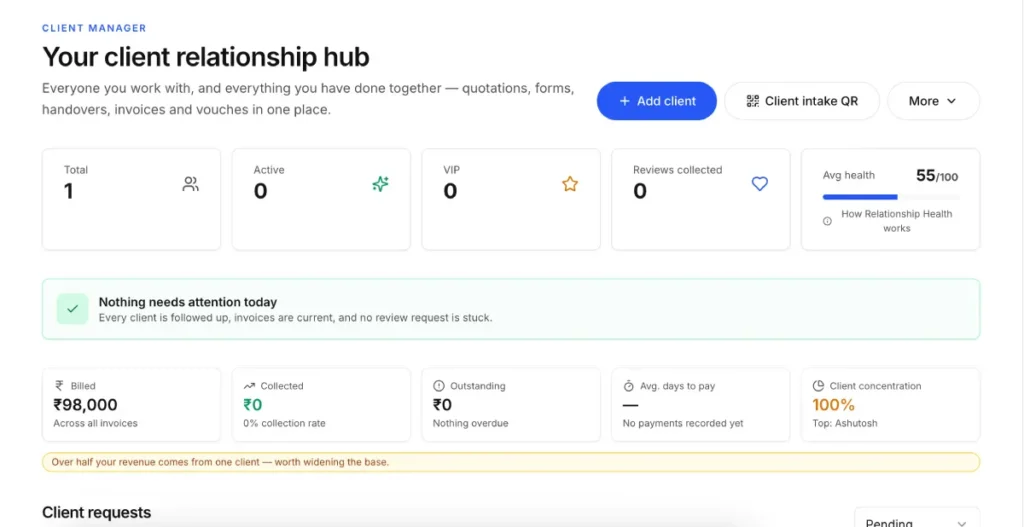
Out of everything we tested, Client Manager became our favourite part of Vouchpi.
At first, it looks simple. We added a client, saved the details, and then picked that client whenever we created another document. The benefit only became obvious after we kept using the platform because we stopped typing the same client information again and again.
Vouchpi also gives businesses a much smarter way to add people.
Clients Can Onboard Themselves
Every business can use a QR code or shareable link for client onboarding. We tested the entire flow instead of simply looking at the QR code.
The process worked like this:
- The prospective client opened the onboarding link.
- They entered their own information.
- Vouchpi sent that information to the business as a request.
- We saw the pending request inside Client Manager.
- We accepted it.
- Vouchpi added that person to our client list.
We then used the same QR code in a real event setting. Instead of stopping and manually adding every person while the event was running, we placed the code at the counter and let clients submit their own details. Later, we could open the requests and accept them together.
That small test changed how we looked at Client Manager. QR onboarding sounds like a nice extra when you read about it, but at a busy counter or event it can genuinely save time.
Client History Makes It More Than a Contact List
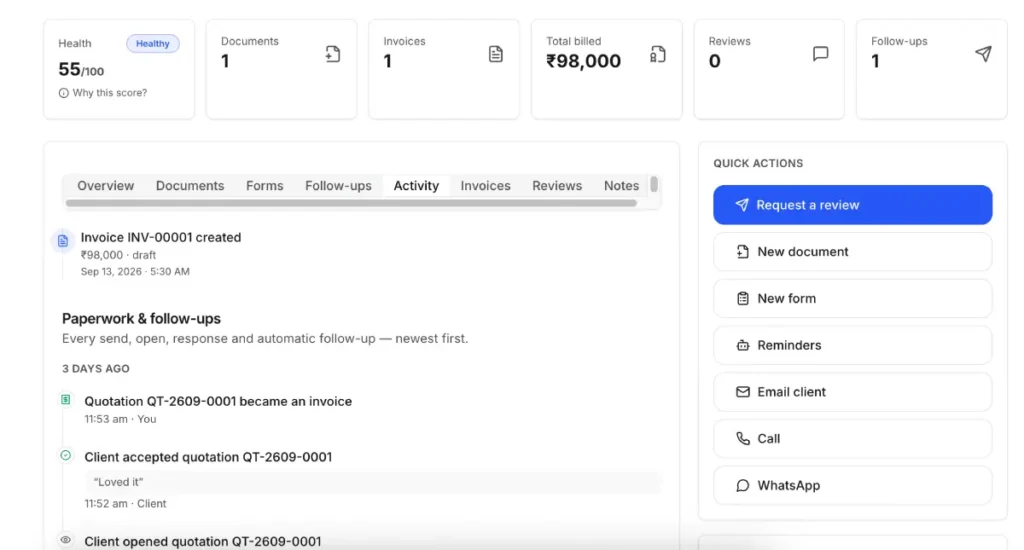
A client’s profile also keeps an activity history. We could see actions such as documents being sent, viewed, accepted, rejected, and later moved into another stage. We could also keep private notes and use groups or tags to organise clients.
Vouchpi’s current site describes the client/project timeline as a place where quotations, approvals, challans, invoices, and reviews appear in the order they happened.
That history gives Client Manager its value. It does not try to become a giant CRM with complex sales pipelines and hundreds of fields. Instead, it helps answer a much simpler question: what has happened with this client so far?
Projects and Products & Services
Projects help organise the work without turning Vouchpi into a full project-management app. We created a project called Wedding Photography and used it to group related work and clients.
We did not find task boards, staff workloads, sprints, or the sort of internal planning you would expect from ClickUp or Asana. Vouchpi uses projects mainly to give client work a clear place to belong.
That becomes useful as the account grows. Five documents are easy to remember. Fifty documents across different clients and services need more structure.
Save Products and Services Once
The Products & Services library solves another common problem: typing the same thing repeatedly.
We could save a product, service, or package and then select it later while creating documents. The records support useful business information such as names, rates, tax information, HSN/SAC codes, and other item details. Vouchpi says documents also keep a snapshot of the item at the time you use it, so changing the product later does not rewrite old paperwork.
In our account, we could also add richer details such as SKUs and several images.
This is the kind of setup that feels slower the first time and faster every time after that. Typing one service description manually takes almost no effort. Typing the same service into fifteen quotations does.
Creating a Quotation in Vouchpi
The quotation builder feels familiar, which helped us get started quickly. We could choose an existing client and project, select a theme, add the quotation details, and build the pricing from scratch or use saved Products & Services.
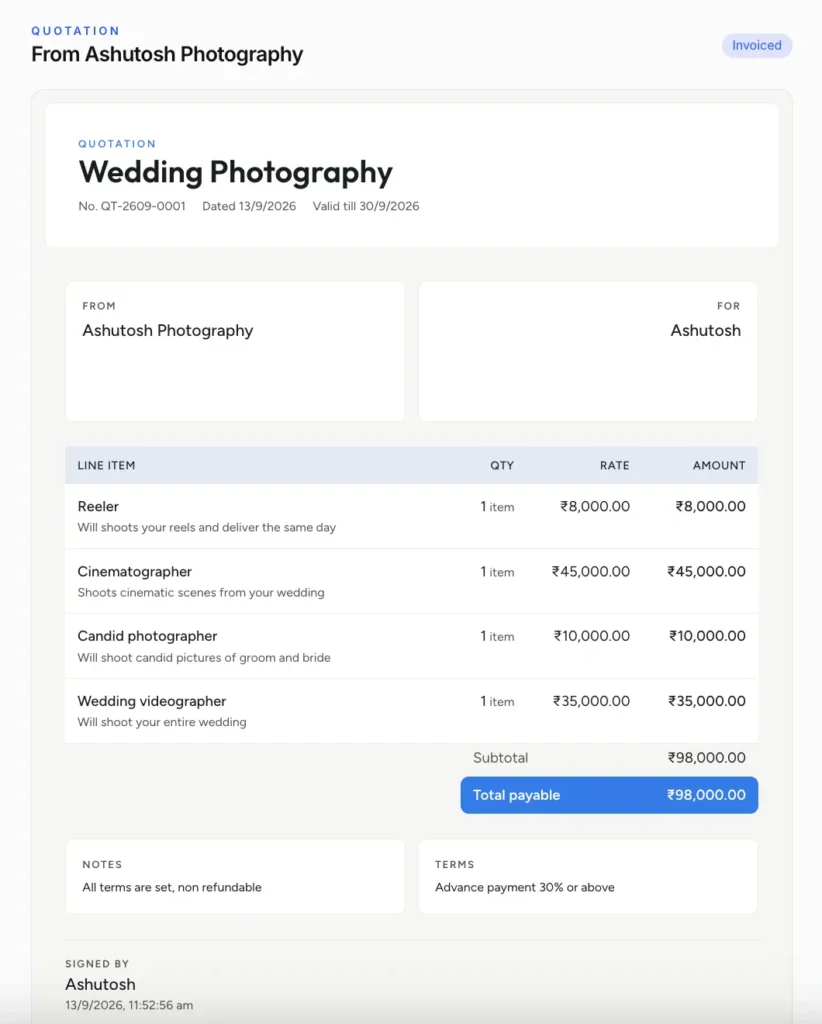
A typical quotation took us through these steps:
- Choose the client and project.
- Pick a design/theme.
- Add the title and reference number.
- Set the issue date and validity.
- Add line items manually or from Products & Services.
- Enter quantity, rate, tax, discount, and description.
- Add notes and terms.
- Download the PDF, copy the link, or use Send Now.
The current quotation tool also supports HSN/SAC codes, automatic totals, validity dates, and paid follow-up reminders.
Creating the document itself worked well, but a good-looking PDF alone would not convince us to use Vouchpi. We can already create quotation PDFs in plenty of places.
The more useful part comes after we send it.
We Accepted One Quotation and Rejected Another
We sent quotations to the client side through WhatsApp and opened them there. The page looked clean, and the client could clearly choose Accept or Decline.
Opening the quotation marked it as viewed. We accepted one test quotation, and Vouchpi stored the acceptance along with the date and time.
We rejected another.
When we declined it, Vouchpi gave us the option to explain why. Back in the business account, we could see that note.
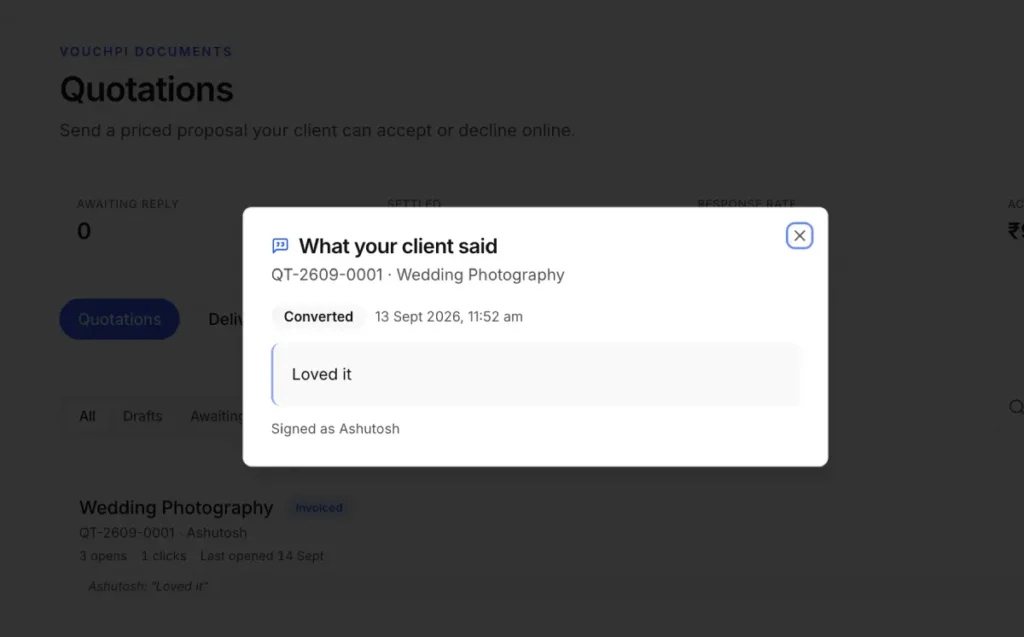
That may sound small, but it makes a real difference. A red “Rejected” badge only tells us that the client said no. A note saying the delivery timeline does not work tells us what we may need to change.
The current Vouchpi quotation guide also says every quotation belongs to a client and project, and the decision appears on the project timeline.
Design Approvals: Much Better Than “Looks Good” on WhatsApp
Design approvals solve a very different problem from quotations. We often approve creative work casually through chat, but that becomes messy as soon as several versions exist.
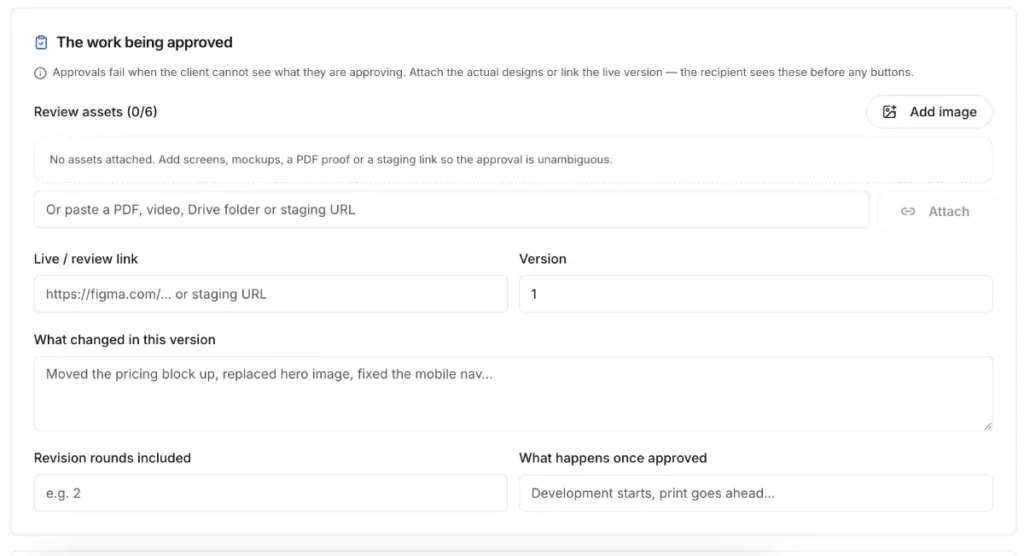
Vouchpi gives the approval its own space.
We could:
- Choose the client and project.
- Add the version we wanted reviewed.
- Attach images, files, or links.
- List what needs approval.
- Send it to the client.
- Let the client approve or request changes.
- Read their comments and send another version when needed.
Vouchpi’s current approval workflow keeps version history, records the named approver and time of approval, and stores change requests with the record.
This feels especially useful for designers, photographers, video editors, agencies, printers, or anyone who regularly hears “yes, this looks good” without a clear record of which version the client actually meant.
We liked that the approval page focuses on the work itself rather than trying to behave like a priced document. It feels like a proper review step.
Delivery Challans: A Proper Tool for Goods Going Out
The Delivery Challan tool also feels different enough from the quotation and invoice builders to justify its own place in Vouchpi.
When we created one, we could add details specifically related to moving goods, including delivery and tracking information. Vouchpi’s current challan flow also includes vehicle number, transporter, e-way bill, LR/docket information, HSN/SAC, quantities, and receipt confirmation from the consignee.
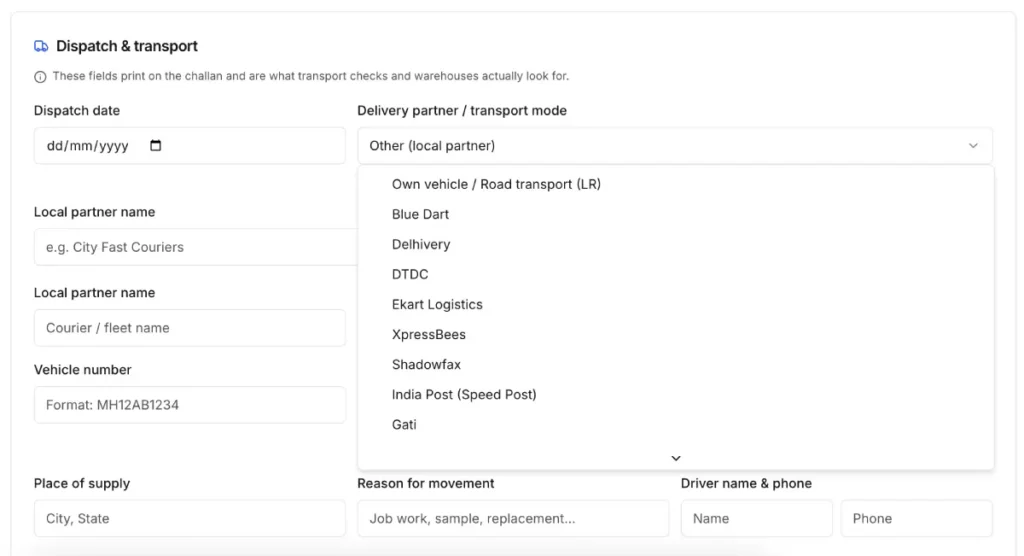
The basic process looks like this:
- Choose the client or consignee.
- Add the goods and quantities.
- Enter transporter and vehicle details.
- Add e-way bill or LR/docket details when needed.
- Add tracking information.
- Generate the challan.
- Download the PDF, copy the link, or send it.
Vouchpi also keeps the challan clearly separate from an invoice. Its current public page includes a transit-only declaration and focuses the document on what moved rather than how much the client owes.
We found this genuinely useful. A small business may need proper dispatch paperwork without wanting to adopt a full inventory or logistics platform.
That said, Vouchpi does not track warehouses or stock like dedicated inventory software. The challan solves the paperwork part of dispatch, not the entire logistics operation.
Project Handovers: A Feature We Did Not Expect to Like This Much
Project Handover sounds less exciting than invoicing or reviews, but it solves a problem many freelancers and service businesses handle poorly.
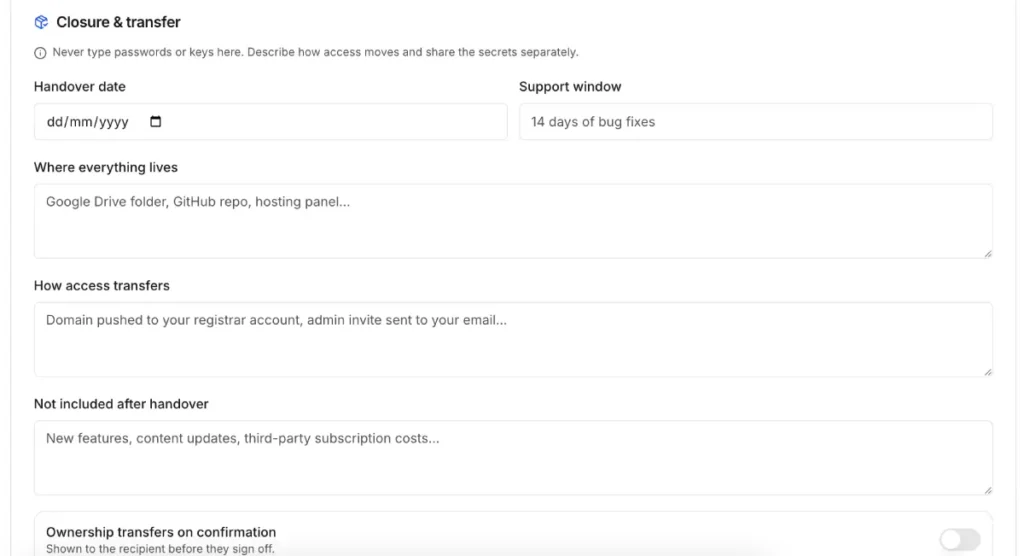
A project often ends with a handful of messages: “Here is the Drive folder,” “Here are the login details,” “Support is available for thirty days,” and “Let me know if you need anything.”
A month later, the client and business may remember that conversation differently.
Vouchpi gives the final delivery its own record. We could include:
- what we delivered;
- where each file lived;
- images, files, and links;
- access or ownership information;
- handover date;
- support period;
- final notes; and
- terms around the handover.
The client can then confirm the handover. Vouchpi’s current guide also lets a handover start from an earlier approval checklist, which helps carry forward what the business already promised.
We think this works particularly well for designers, developers, photographers, marketers, and agencies. The feature does not make project delivery complicated; it simply gives both sides one clear place to see what the business actually handed over.
Vouchpi also connects a confirmed handover with the next logical action: asking for a review.
That transition makes sense because the client has just received the finished work and still remembers the experience clearly.
Invoices: Useful Because They Do Not Start From Zero
Vouchpi lets you create invoices from scratch, but we think the better experience comes from an accepted quotation.
When we created an invoice manually, we could select the client, choose a theme, add invoice details, build the line items, enter GST-related information, add payment instructions, and include notes or terms.
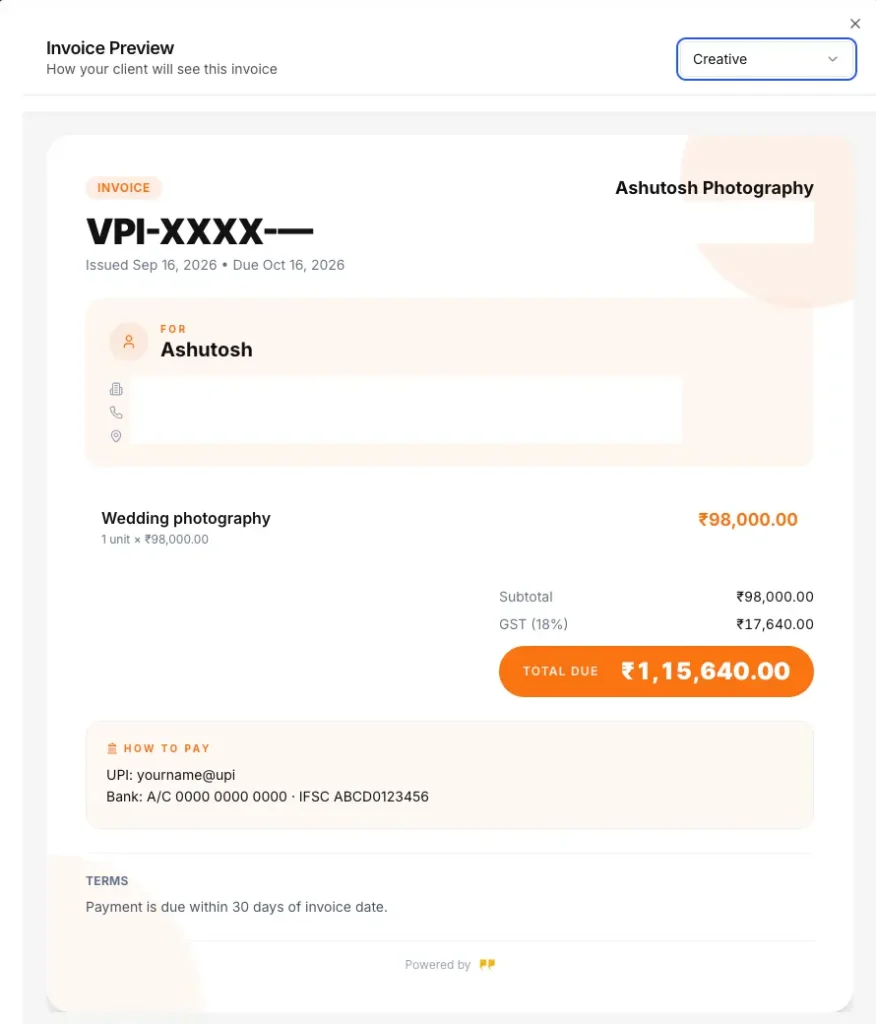
The normal process is simple:
- Choose the client.
- Add invoice details.
- Add line items or saved products/services.
- Add GST and tax information.
- Enter payment instructions.
- Add notes and terms.
- Send the invoice or share the link.
Vouchpi also lets businesses record full or partial payments after they receive the money elsewhere.
Converting a Quotation Was Better
We then opened an accepted quotation and chose Convert to Invoice.
Vouchpi created the invoice from the information we had already entered. We could still make changes before sending it, but we did not need to rebuild the client, items, or pricing from the beginning.
That is exactly the sort of boring repetition Vouchpi should remove.
The current invoice guide says line items, tax, and totals carry over from the accepted quotation, while the paid invoice tools add sequential numbering, public payment status, overdue tracking, and WhatsApp/email reminders.
Clients receive an online invoice and can also download the PDF. Our client-side version used an access code, and we also saw a report option in case the recipient received incorrect information or suspected abuse.
One important point: Vouchpi does not collect the payment itself. It helps create and track the invoice, while the actual money moves through whatever payment method the business already uses.
Forms: More Useful When They Lead Somewhere
At first, Forms looks like the easiest Vouchpi feature to dismiss. Google Forms already gives businesses a free way to ask questions and collect responses.
The difference Vouchpi tries to make is what happens before and after the form.
We could start from a template or build a form ourselves, change its appearance, share it through a link, or send it directly to a client through WhatsApp.
A basic form workflow looks like this:
- Pick a template or start blank.
- Add the questions you need.
- Choose a theme.
- Connect the form with the relevant work.
- Share the link or send it to a client.
- Receive the response.
- Continue the job using that information.
The current Vouchpi homepage advertises 40+ form templates and 20+ field types, including product pickers, file uploads, ratings, signatures, and conditional sections. It gives examples such as new-client intake, project briefs, wedding-shoot enquiries, site surveys, orders, feedback, events, and support requests.
Vouchpi also says responses can appear next to the client’s other work, forms can use products from the Products & Services library, businesses can share forms through short links or QR posters, and a completed brief can move into a priced quotation.
This is where Forms starts making sense inside Vouchpi. We would not subscribe only because Vouchpi has a form builder. We would use its forms because the business may already have the client, project, products, documents, and later follow-up in the same place.
Vouchpi charges one credit when a client response arrives, rather than charging merely because we created the form.
Reviews: Vouchpi Still Knows This Part Very Well
Vouchpi started with a much stronger focus on testimonials, and we can still see that experience in the current review tools.
Businesses can send requests to individual clients or multiple people and choose how much detail they want from the response.
Vouchpi Review Types
| Type | Credits | What It Asks For |
|---|---|---|
| Quick | 1 | Rating and short feedback |
| Detailed | 3 | More context about the experience |
| Case Study | 5 | A deeper story with outcomes |
Vouchpi’s current guide describes the same three levels and positions them for different depths of feedback.
We could select an existing client or enter recipient details manually, choose the project, and edit the message before sending it.
The project connection matters. A review no longer sits as a random quote from “someone.” It can belong to the actual work that produced it.
Verification
Vouchpi uses email or phone OTP before it treats a review as verified. The company says it checks verification server-side before publishing the review.
That does not mean Vouchpi can prove every opinion inside the review as a fact. Verification simply gives the testimonial a clearer origin than a business manually typing a quote onto its own website.
For a business that wants to show proof to future clients, that extra layer matters.
Moments: A Better Way to Collect Reviews Repeatedly
Moments make more sense when a business wants one reusable way to ask for reviews instead of building an individual request every time.
When we created a Moment, Vouchpi let us choose the type of review, select a project, decide whether the link should expire, and choose whether people could use it once or repeatedly.
That gives Moments several practical uses. A photographer can share one after delivering a gallery. A shop can put a QR code near the counter. A consultant can send the link after a session. An event business can use a physical QR code while people still remember the experience.
Vouchpi’s QR tools also support printable codes for review collection, including PNG and SVG downloads.
The timing matters as much as the technology. We think businesses have a much better chance of collecting useful feedback right after the work ends than by chasing a client several weeks later.
Public Walls: More Than a Page Full of Testimonials
Public Walls turn those reviews into something businesses can actually show other people.
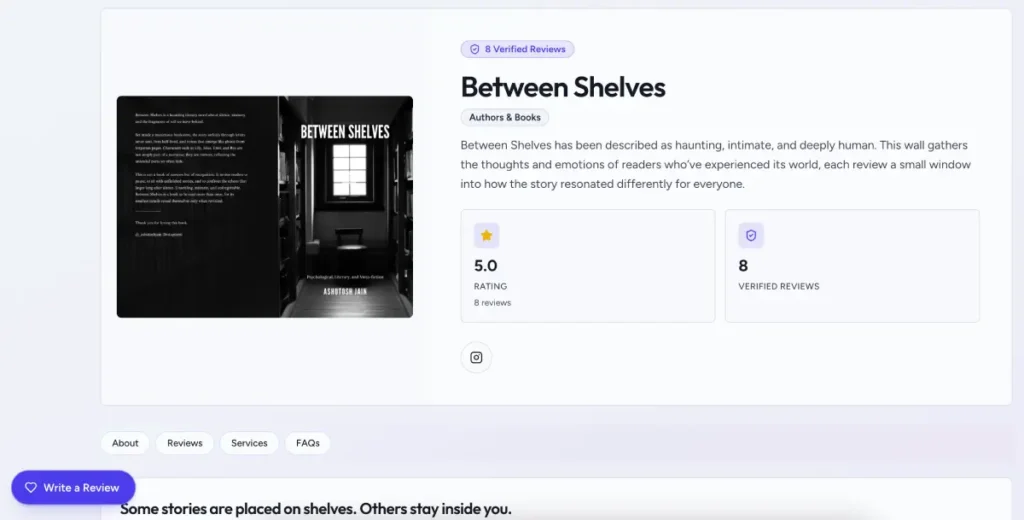
Creating one takes more time than making a document because there is much more to customise. We could add a hero image and description, business details, reviews, products, social profiles, links, FAQs, a gallery, Moments, quick actions, and another custom section.
We also had multiple colour schemes to choose from.
Vouchpi calls the Wall a “trust homepage” and lets businesses change the theme, hero copy, layout, and the way reviews appear.
The current product also supports embedding public proof elsewhere, including wall carousels and individual reviews.
Products Beside Reviews Work Better Than We Expected
At first, we wondered whether putting products and services next to testimonials would make the Wall feel crowded.
After using it, we understood the idea.
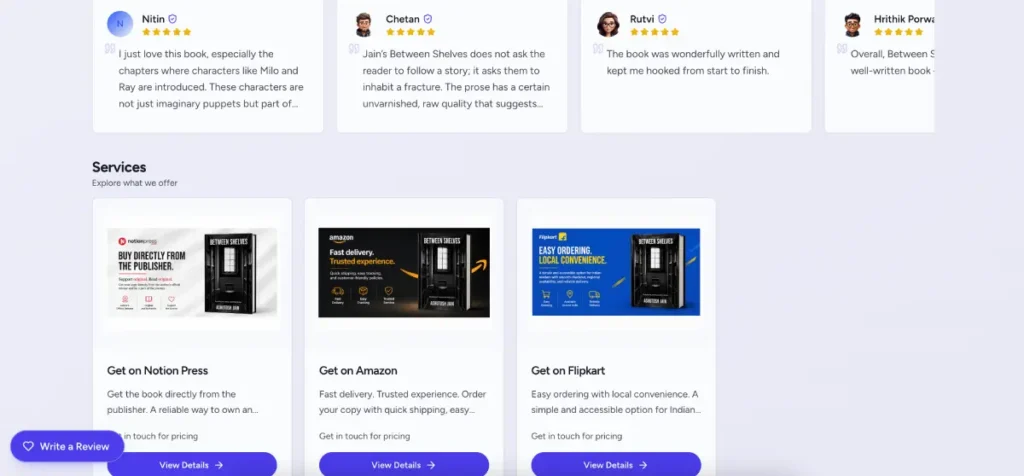
Someone reading wedding-photography reviews may also want to know which packages the photographer offers. Someone reading a consultant’s case study may want to see the service behind that result.
The Wall can therefore answer three questions on one page:
- What does this business do?
- What did previous clients say?
- How do I contact or work with them?
For a freelancer without a full website, that can become a useful public page. For an established business, the Wall can act as a dedicated proof page inside proposals, bios, social links, or sales conversations.
Vouchpi’s freelancer page especially pushes this idea through media-rich vouches, one-link Walls, and proof that freelancers can reuse in pitches.
WhatsApp and Email Fit the Way Clients Already Work
WhatsApp may be one of Vouchpi’s most important choices for India.
Small businesses already use it to discuss prices, send files, confirm dates, answer questions, and follow up. Vouchpi does not try to replace that habit. Instead, it lets the formal action arrive through WhatsApp while keeping the result inside Vouchpi.
That worked well in our testing. A quotation could arrive on WhatsApp, but the client accepted it on a proper Vouchpi page. A form could arrive through WhatsApp without us manually copying the link into the chat. A review request clearly showed which professional sent it.
Vouchpi says it uses the official WhatsApp Business Platform for paid WhatsApp delivery and records client permission and verified numbers before messages go out.
Email remains available too. Paid accounts also get delivery, open, and click tracking on email according to the current features page.
We especially liked that Vouchpi charges the same action credit whether we send through email, WhatsApp, or both.
Inbox, Notifications, Reminders, and Analytics
Vouchpi has several places where activity appears, and we needed a little time to understand what each one does.
- Client activity gives us the history of one person.
- Notifications focus on important events such as an accepted or rejected quotation or a received review.
- Inbox works more like a document box for things another Vouchpi user sends to us rather than a messaging inbox.
Once we understood that difference, the layout made more sense.
Reminders also worked well in our tests. Because Vouchpi already knows the client and document, a reminder can relate directly to the actual quotation or invoice instead of becoming a generic note on a calendar.
The platform currently puts a lot of attention on its “Needs Attention” dashboard, which surfaces things such as unanswered documents, overdue invoices, pending reviews, and new form responses.
We prefer that approach to opening a business dashboard and seeing ten graphs before we know whether a client still owes us a response.
Analytics are available too, including data around documents, invoices, and reviews on Paid accounts.
Vouchpi Free Tools: Useful Even Without an Account
Vouchpi currently opens four of its document builders to anyone without requiring signup:
| Free Tool | What It Creates |
|---|---|
| Quotation Maker | Priced quotation with GST |
| Delivery Challan Maker | Dispatch document with transport details |
| Design Approval Maker | Client sign-off document |
| Project Handover Maker | Completion and deliverables document |
The free tools let users fill in the document and download a print-ready PDF. Vouchpi says they do not require an account or add a watermark.
We like this approach because the tools remain genuinely useful even if someone never signs up.
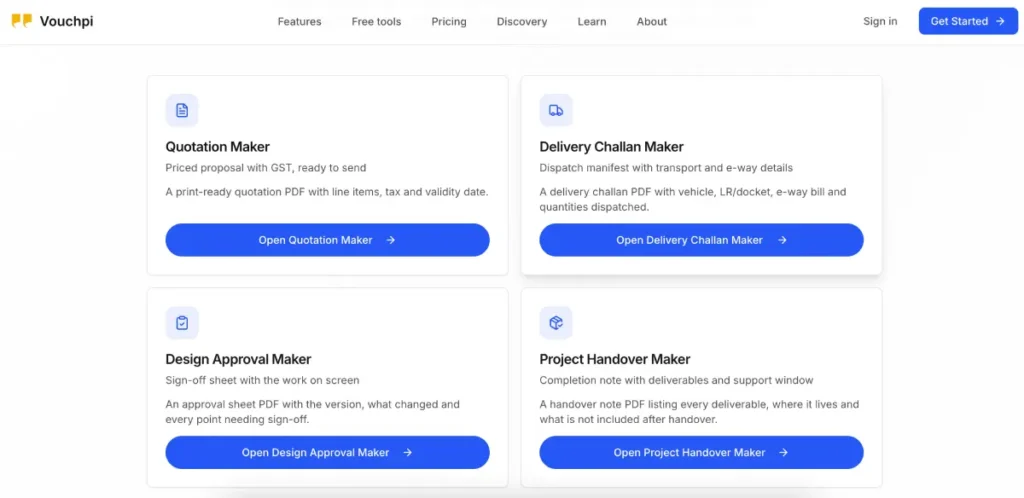
The difference becomes clear once the user wants more than the PDF. The free tool does not send WhatsApp messages on the user’s behalf. An account adds hosted links, client responses, tracking, history, and the connections between documents.
So we would describe the split this way:
| Free Builder | Vouchpi Account |
|---|---|
| Create the document | Create it against a client/project |
| Download PDF | Send hosted link |
| Share manually | Send by email/WhatsApp |
| Static file | Track response/status |
| No client history | Add events to Client Manager |
| Standalone tool | Continue into the next workflow |
That is a good freemium model. Someone who needs one quotation does not have to create another account. Someone who sends quotations every week has a reason to sign in.
Mobile Experience
We paid particular attention to the client-facing mobile experience because many Vouchpi links will reach people through WhatsApp.
The pages we tested worked well on a phone. We could read the quotation without awkward zooming, understand the buttons, and move through client actions without the layout breaking.
That matters because the business user may create everything from a laptop while the client never leaves their phone.
We also liked that recipients can open documents such as quotations, challans, handovers, invoices, forms, or review requests in a browser without needing their own business account. Vouchpi describes that same browser-first approach on its How It Works page.
A client should not need a training video just to accept a quote. During our tests, they did not.
Privacy, Cookies, and Support
Vouchpi handles client names, phone numbers, email addresses, forms, documents, and reviews, so we wanted to look beyond the main product pages too.
Its Privacy & Data Requests page lets people ask for a copy of their data, correct it, erase it, withdraw consent, nominate someone to act for them, or raise a grievance. A person does not need a Vouchpi account to make one of these requests.
Cookies
Vouchpi also publishes a separate Cookie Policy. It breaks cookies into essential, analytics, functional, and marketing categories. Essential cookies cover things such as login sessions and security, while functional cookies can remember preferences, Wall settings, and form drafts.
The policy says users can manage cookie preferences and also explains what may stop working if they block certain cookies, such as saved dashboard preferences or form-builder drafts.
Support
The Support Center gives users three clear routes: email, Community Forum, and a support-ticket form. Vouchpi currently says email support aims to respond within 24 hours.
The support form also explains what information it collects, why Vouchpi uses it, and how long it keeps support tickets. The current notice says support tickets remain for 24 months before deletion.
For a small SaaS product, we like seeing privacy requests, consent information, cookie controls, and support notices written out instead of hidden behind one vague policy link.
What We Liked Most About Vouchpi
After spending time with the platform, a few strengths mattered much more than the rest.
1. Client Manager Makes Everything Else Better
This is still our favourite feature.
Without Client Manager, Vouchpi would give us several useful tools under one login. With it, each document starts adding to one continuing client history.
The value becomes clearer with repeat work. We can return to the same client later and see what already happened instead of searching through old messages and files.
2. Vouchpi Reuses Information Instead of Making Us Start Again
The best time-savers are not dramatic.
We selected an existing client instead of typing the details again. Then we picked a saved service instead of rewriting the line item and converted an accepted quotation into an invoice instead of building the invoice again.
Individually, each saves a small amount of time. Across many clients, those small savings start to matter.
3. The Document Types Actually Feel Different
We expected some overlap between quotation, approval, challan, handover, and invoice builders.
Instead, Vouchpi gives each one fields that fit its job.
The approval focuses on versions and sign-off. The challan focuses on transport and goods. The handover focuses on deliverables and support. The invoice focuses on billing.
That makes the product feel much more thought-out than a template collection.
4. WhatsApp Makes Sense Here
We have seen plenty of business software add a Share to WhatsApp button and call it integration.
Vouchpi uses WhatsApp as part of the actual workflow. The client receives the link where they already communicate, while Vouchpi keeps the formal response.
For Indian freelancers and SMBs, we think this matters.
5. Reviews Feel Like Part of the Job
Vouchpi’s old testimonial focus could easily have become a separate corner of the app after the product expanded.
Instead, reviews now make more sense because they sit at the end of the job.
The business finishes the work, hands it over, and then asks for proof while the experience is still fresh.
What Vouchpi Still Needs to Improve
We did not run into a major broken workflow during our testing, so our main complaints have more to do with usability and fit than reliability.
The First Dashboard Needs Better Guidance
Vouchpi looks busier than it really is during the first login.
We would like a clearer onboarding path that takes a new user through one complete example:
- Add your client.
- Create the project.
- Add your service.
- Make a quotation.
- Send it.
- See the client respond.
- Continue from there.
That would teach the product much faster than showing every module at once.
Setup Takes Time Before It Saves Time
Vouchpi works best after we give it information to reuse.
That means the first client, first project, first service, first Moment, and first Public Wall take more work than opening a Word template.
The payoff comes later.
We think Vouchpi should make that trade-off clearer to new users so they do not judge the product only by their first half-hour.
Thirty Credits Will Not Suit Every Business
The base price looks cheap, and it is, but heavy users need to remember that Paid includes 30 credits rather than unlimited sends.
A small consultant may never care.
A company issuing dozens of invoices and challans will.
At least Vouchpi offers top-ups instead of forcing users into many different subscription tiers, but businesses should still calculate their likely monthly use.
It Does Not Replace Specialist Business Software
Vouchpi creates GST invoices, but it does not keep full books. It:
- stores clients, but it does not run a deep sales pipeline.
- creates challans, but it does not manage a warehouse.
- records payment status, but it does not process the payment.
We think Vouchpi becomes a better product when buyers understand those limits before signing up.
Vouchpi vs Refrens vs Zoho Books vs Bonsai vs HoneyBook
Vouchpi does not have one perfect competitor. Its features overlap with several types of software, so we compared it with products that a freelancer or small business could realistically consider for at least part of the same work.
Quick Comparison
| Feature | Vouchpi | Refrens | Zoho Books | Bonsai | HoneyBook |
|---|---|---|---|---|---|
| Main focus | Connected client paperwork and proof | Broad SMB operations | Accounting and GST | Freelancer/agency operations | End-to-end clientflow |
| Free option | Yes | Yes | Yes | Trial | Trial |
| Paid starting point | ₹249/mo incl. GST | ₹5,900/year Accounts Lite | ₹749/mo Standard annually | $19/user/mo annual Essentials | $29/mo annual Starter |
| Quotations | Yes | Yes | Yes | Proposals | Proposals |
| Invoices | Yes | Yes | Yes | Yes | Yes |
| Payments built in | No | More support | Yes | Yes | Yes |
| Full accounting | No | Available on higher plans | Core feature | No | No |
| Dedicated design approval | Yes | Broader workflows on higher plans | No | Not the same focus | Contracts/proposals |
| Delivery challan | Yes | Yes | Transaction tools | Not India-focused | Not India-focused |
| Dedicated handover | Yes | Not a central feature | No | Broader project tools | Broader clientflow |
| Forms | Yes | Yes | Limited different use | Yes | Lead forms |
| Verified reviews | Yes | Testimonials | Not core | Not core | Not core |
| WhatsApp focus | Strong | Yes on paid | Different approach | Not India-first | SMS/client portal |
| Contracts/e-sign | Limited | Digital signatures | Not core | Strong | Strong |
| Internal project tools | Light | Broader business tools | Accounting projects | Strong | Stronger |
| India-focused | Yes | Yes | Yes | International | No |
Vouchpi vs Refrens
Refrens gives Vouchpi its closest Indian comparison because both products cover clients, quotations, invoices, reminders, testimonials, and business paperwork. The big difference is how far each one wants to go.
Refrens’ free plan currently gives users 15 documents along with client management, payment tracking, expenses, purchases, testimonials, a sales pipeline, lead forms, cloud storage, and two users. Accounts Lite costs ₹5,900 per year, roughly ₹492 per month, and adds unlimited documents, WhatsApp sharing, recurring invoices, multi-currency support, reports, email tracking, and signatures. Higher plans move much deeper into GST compliance, accounting, bank reconciliation, e-invoices, inventory, workflows, and warehouses. Prices exclude GST.
Vouchpi stays much lighter. It does not try to match Refrens on accounting or business administration, but it gives more attention to the flow of one client job: approvals, handovers, client history, OTP-verified reviews, Public Walls, and a clearer connection between finished work and proof.
- Pick Refrens when accounting-adjacent work, expenses, purchases, CRM depth, signatures, or future inventory matter.
- Pick Vouchpi when you want a simpler client-work layer, like the approval/handover approach, rely heavily on WhatsApp, and want verified proof at the end.
Vouchpi vs Zoho Books
Zoho Books and Vouchpi both create quotations and invoices, but we would not treat them as direct replacements.
Zoho Books focuses on accounting. Its Free plan already includes quotes, invoices, expenses, bills, bank reconciliation, inventory, GST reporting, sales and purchase orders, customer portals, and financial statements. Standard costs ₹899 per month or ₹749 per month when billed annually and expands the accounting, banking, inventory, GST, and reporting tools.
Vouchpi does not try to compete with that. We cannot use it for proper bookkeeping, P&L statements, bank reconciliation, or a full accounting record.
The advantage appears on the other side of the client relationship. Vouchpi gives us dedicated design approvals, handovers, QR onboarding, review requests, Moments, Public Walls, and a much stronger focus on moving the same client through the work.
For many businesses, the sensible answer may actually be both rather than either/or.
- Use Zoho Books to keep the books and handle finance properly.
- Use Vouchpi if you want a lighter place for the client-facing paperwork and decisions that happen around the job.
Vouchpi vs Bonsai
Bonsai comes much closer to the idea of running a complete freelancer or agency business.
Its Essentials plan currently costs $19 per user per month when billed annually or $25 per user per month. It includes invoices and payments, proposals and contracts, forms, scheduling, client portals, expenses, and income tracking, while Basic already includes CRM, tasks, time tracking, unlimited projects, clients, and a service library. Premium adds Gantt views, workload management, deal pipelines, client messaging, profitability reports, and integrations.
Bonsai clearly offers more operational depth than Vouchpi. A freelancer who wants contracts, payments, scheduling, time tracking, tasks, and project profitability may get much more from Bonsai.
Vouchpi feels smaller by choice. It costs far less, uses INR pricing, handles India-friendly documents such as GST quotations and delivery challans, and puts much more emphasis on WhatsApp and verified client proof.
- Pick Bonsai when you want to run most of your freelance or agency operation from one platform.
- Pick Vouchpi when you mainly want client paperwork and proof connected without paying for a much larger operating system.
Vouchpi vs HoneyBook
HoneyBook provides a useful picture of how mature client-management software can grow, although Indian businesses cannot currently sign up because HoneyBook supports the U.S., Canada, the UK, and Australia.
Its Starter plan costs $29 per month billed annually and includes unlimited clients and projects, invoices and payments, proposals and contracts, templates, a client portal, basic reports, lead forms, and HoneyBook AI. Essentials costs $49/month when billed annually and adds scheduling, automation, QuickBooks integration, team members, more lead forms, and SMS reminders.
HoneyBook goes further than Vouchpi in contracts, e-signing, payments, scheduling, automation, and the whole lead-to-payment journey.
Vouchpi takes a different path. It focuses more on Indian paperwork, WhatsApp, delivery challans, handovers, and verified reviews after the project.
For an Indian reader, we see HoneyBook more as a benchmark than a direct option.
- HoneyBook shows how deep a clientflow platform can become.
- Vouchpi offers a much simpler and dramatically cheaper version of the idea for an Indian small-business setting.
Who Should Use Vouchpi?
Vouchpi makes the most sense when you repeatedly work with clients, and the relationship includes more than one piece of paperwork.
Freelancers
We think freelancers are one of the strongest fits.
Designers, writers, developers, photographers, marketers, and consultants often create quotations, collect briefs, ask for approvals, invoice, deliver work, and then need testimonials. Vouchpi connects many of those steps without forcing them into a heavy CRM.
Vouchpi’s freelancer page also puts a strong focus on media-rich reviews and one-link Public Walls that freelancers can reuse in proposals, email signatures, DMs, and profiles.
Photographers and Creative Studios
This may be Vouchpi’s best use case.
Quotation → approval → handover → invoice → review feels very natural for creative work. Versioned approvals solve a real problem, and a Public Wall gives the business somewhere to show previous work and client feedback together.
Agencies
Vouchpi can handle the client-facing part of agency work well, particularly quotations, approvals, client records, handovers, and reviews.
Larger agencies will still need proper internal project management, resource planning, or time-tracking software.
Consultants and Service Businesses
Client history, quotations, forms, invoices, notes, and reviews all fit consulting and other professional services.
Repeat clients make Client Manager even more useful.
Local Businesses and Events
QR onboarding and review collection give Vouchpi an interesting offline use case.
We tested client onboarding at an event ourselves, and it worked much better than manually entering every person.
Businesses That Send Goods
The challan builder adds value here, especially for smaller businesses.
Just remember that Vouchpi handles the paperwork around dispatch; it does not replace an inventory or warehouse system.
Who Should Skip Vouchpi?
We would look elsewhere first if the main thing you need is:
- full accounting and bookkeeping;
- bank reconciliation;
- inventory and warehouse control;
- payroll;
- advanced sales CRM;
- integrated online payments;
- complex contracts and e-signatures;
- internal task and team management; or
- enterprise reporting and operations.
Vouchpi may still work alongside those products, but it does not try to replace them.
Frequently Asked Questions [FAQs]
Yes. Vouchpi currently gives Free accounts 10 credits every month and allows up to 25 active clients. It also offers no-signup quotation, challan, approval, and handover makers.
The paid plan costs ₹249/month, including GST. Vouchpi currently charges ₹1,299 for six months and ₹2,299 for one year, which works out to roughly 13% and 23% savings compared with paying monthly.
Free includes 10 every month. Paid includes 30 every month.
Yes. Paid users can buy 25, 50, 100, 250, or 500-credit packs.
Sending a quotation uses 3 credits.
Sending an invoice uses 5 credits.
No. Building and saving the document does not itself use credits. Vouchpi charges mainly when the workflow moves to the client side.
Vouchpi says no. A supported send uses the same action cost whether it goes by email, WhatsApp, or both.
Yes. Businesses can share an onboarding link or QR code, review incoming requests, and accept people into Client Manager.
Yes. We tested both acceptance and rejection. The client can also leave an optional reason when declining.
No. Vouchpi can record invoice payment status, including full or partial payment, but it does not act as the payment gateway.
Yes. We used the conversion ourselves. Vouchpi carries the quotation details into an editable invoice.
Vouchpi uses email or phone OTP verification before treating the review as verified.
Moments are reusable or controlled links for collecting reviews. Businesses can connect them to a project, choose the review depth, and control expiry or reuse.
The client-facing workflows we tested open through browser links and do not require the recipient to use the business dashboard. Vouchpi also says its client documents can open on a phone without the recipient needing an account.
No. It can create quotations and GST invoices, but it does not replace full bookkeeping, reconciliation, financial statements, or tax-accounting software.
Final Verdict: Is Vouchpi Worth It?
When we first looked at Vouchpi, we could easily see each feature on its own. There was a quotation maker, an approval tool, invoices, forms, Client Manager, reviews, and Public Walls. None of those categories lack competition.
The product became much more interesting after we started moving the same client through them.
A person who onboarded through a QR code did not disappear into a separate list. We could accept them into Client Manager and reuse their details later. The quotation we sent did not simply become another PDF; the client could view it, accept it, or reject it with a note. Once they accepted it, we could turn the same quotation into an invoice instead of starting again.
Approvals gave us a proper place for client sign-off instead of relying on old messages. Handovers gave completed work a clear ending. The client history kept these actions easier to find later. When the project ended, Vouchpi’s review system gave us a natural way to ask for proof while the experience was still fresh.
That is the part we think matters most.
Vouchpi does not win because it has more features than every competitor. It wins when one feature saves information that makes the next feature easier.
The product still needs improvement. New users need stronger guidance through the first dashboard. Setting up projects, services, Moments, and Public Walls takes time. Heavy users need to watch their credit balance, and businesses looking for accounting, payments, inventory, e-signatures, or advanced team management will still need other software.
We do not think those limits make Vouchpi unsuccessful. In several cases, they help keep the product focused.
At ₹249 per month including GST, with a ₹1,299 six-month plan and ₹2,299 annual plan, Vouchpi does not need to replace a complete business software stack to make sense. It needs to save enough time, reduce repeated data entry, searching through chats, and missed follow-ups to justify its cost.
For freelancers, photographers, designers, consultants, studios, agencies, and smaller service businesses that regularly exchange paperwork with clients, we think it can.
The first few minutes with Vouchpi did not impress us as much as the later ones. The empty dashboard looked like a lot of different tools. Once we filled it with actual clients, projects, products, documents, responses, and reviews, those tools started feeling like parts of one job.
That is why Client Manager remains our favourite feature, and it is also the biggest reason Vouchpi earns our recommendation.
Scores and Experiences
Vouchpi Review: We Tested the Client-Work Platform-
Client Manager & Client History9/10 AmazingOur favourite part of Vouchpi; useful onboarding, notes, organisation, and activity history
-
Quotations & Invoices9/10 AmazingStrong client response flow and useful quote-to-invoice conversion
-
Approvals, Challans & Handovers9/10 AmazingEach tool handles a clearly different job instead of reusing one generic template
-
Forms8/10 Very goodMuch more useful when we connect forms with clients, projects, and later work
-
Client-Side Experience9/10 AmazingClean links, clear buttons, and little explanation needed
-
WhatsApp & Email9/10 AmazingExcellent fit for Indian SMB communication habits
-
Reviews, Moments & Public Walls9/10 AmazingOne of the more mature parts of Vouchpi and a natural end to completed work
-
Ease of Use8/10 Very goodEasy after setup, but the first dashboard needs better guidance
-
Pricing & Value9/10 AmazingLow subscription price and flexible credit packs; high-volume users need to plan
-
Privacy & Support9/10 AmazingClear privacy-request tools, cookie controls, grievance route, and support options
-
Mobile Experience9/10 AmazingClient-facing pages worked well during our testing
-
Reliability9/10 AmazingWe did not run into a meaningful failure in the workflows we tested